Introducing Decant: Insights for your Claude Code and Codex sessions
Claude Code and Codex log every session you run. Decant turns those logs into real numbers for what your agents did and how much it cost, without leaving your machine.

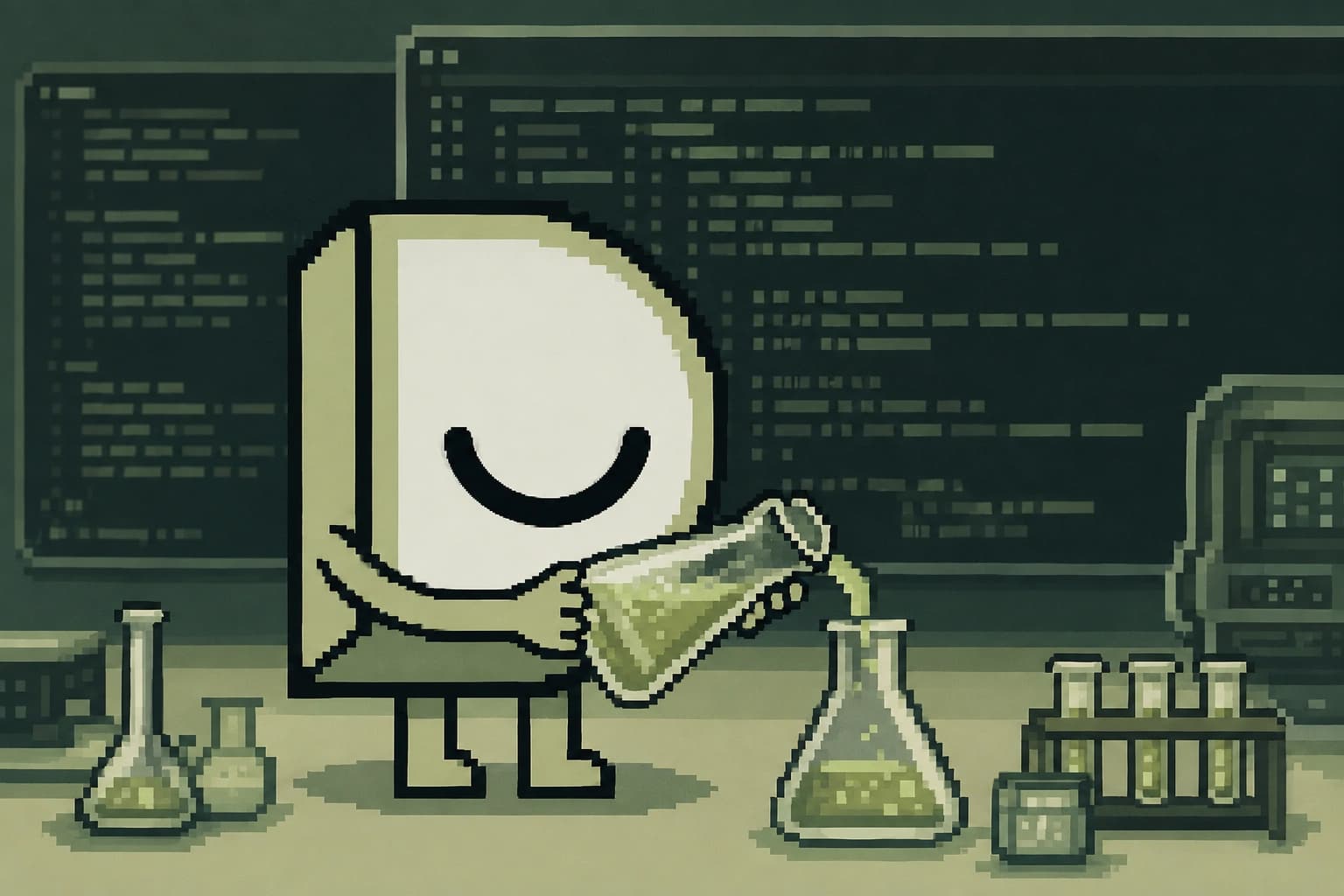
What did your coding agent do yesterday? How many tool calls did it make, and what knowledge did it use before making changes? Are you getting value from your agents?
All of these questions come up when we speak with our customers about how they use their coding agents. Many tools can tell you how much your agents spend. But making sense of how your agents spend time across gathering context, planning work, writing code, and communicating is much harder to see.
While agents are running, they capture lots of information about how they operate. Claude Code and Codex log each session you run (for example, prompts, responses, tool calls) along with each file your agent worked with. So, how can we transform agent logs into something more useful?
Use Decant with your Claude Code and Codex logs
Decant to the rescue! Our customers kept asking where their tokens were going and how Dosu was helping during those sessions, so we built Decant to answer those questions.
We normalize the JSONL logs that Claude Code stores at ~/.claude/projects, and Codex at ~/.codex/sessions, into one SQLite archive on your machine, then give you a helpful web app that converts cost, time, and other stats into actionable insights. Decant also has a CLI and API if you want to extend your analysis with other tools.
Want to give Decant a try? You can start by running the following command.
npx @dosu/decant@latest
Decant opens in your default browser and syncs in the background, pricing and indexing your history as it lands. You can also run npx @dosu/decant@latest --help to see the CLI options, including --db to point Decant at a specific database file.
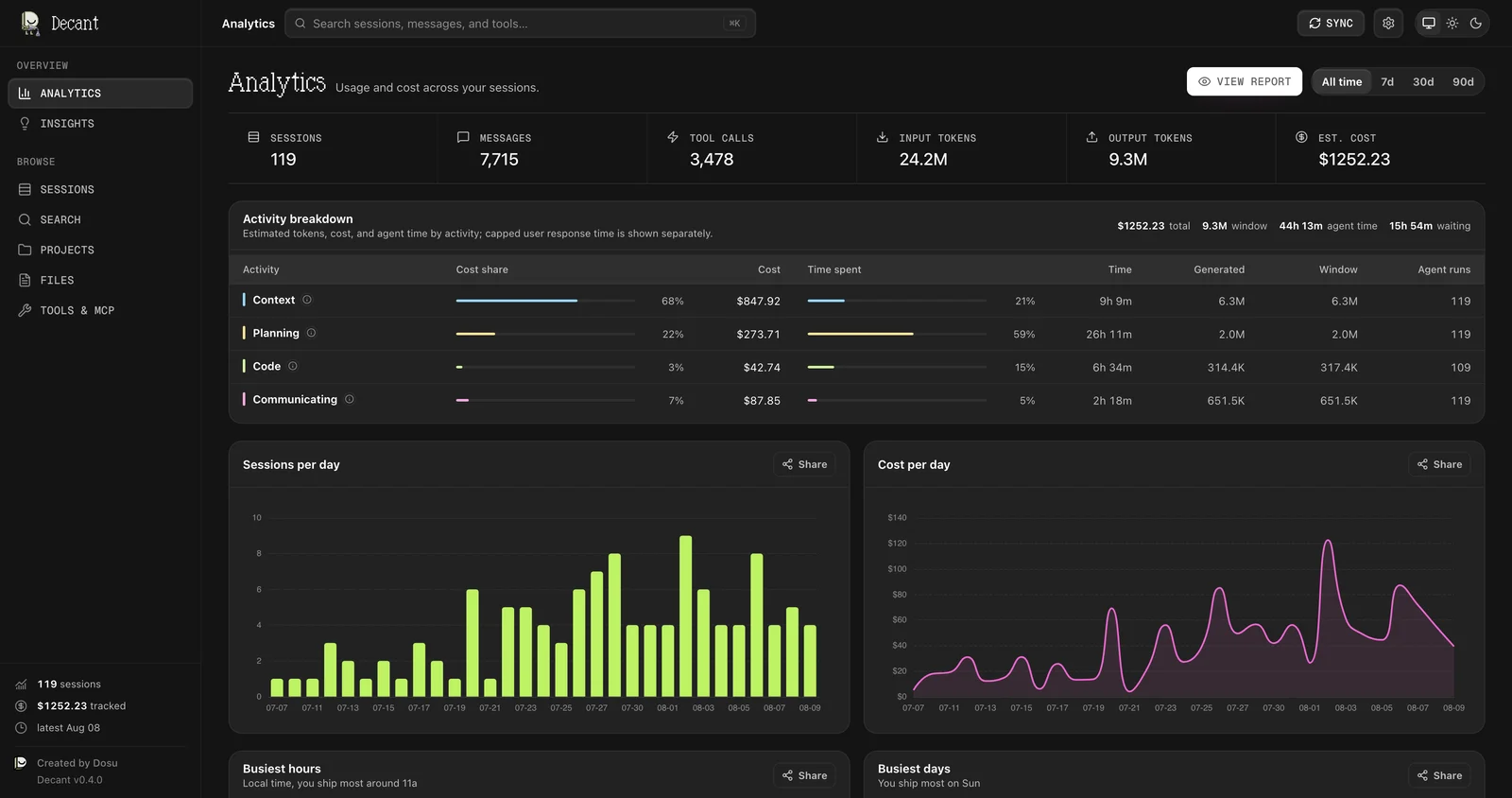
Decant's Analytics view on a demo archive over 119 sessions and $1,252.23 estimated cost, split across context, planning, code, and communicating.
If npx isn't your preferred way to run apps, install Decant via Homebrew or Docker, or clone the repo and run it from source with bun run dev.
brew tap dosu-ai/dosu
brew trust dosu-ai/dosu   # Homebrew 6.0+ only; skip on older versions
brew install decant
But what about security? We've got you covered! Decant ingests the files you already have and makes no outbound calls. That means your sessions, data, and outputs stay safely stored on your machine.
Where are your tokens going?
Open any session, and you can see your agent's work across four buckets. Context covers reads, searches, and web or MCP retrieval, plus read-only shell commands like rg and git diff. Planning covers reasoning blocks and plan tools. Code covers structured edits and the shell commands that build, test, or write files, and Communicating is whatever your agent says back to you. The Analytics view shows you the breakdown across your entire history, and our methodology doc shares how we categorize agent runs.
Decant reflects token pricing that your sessions use via standard API rates. So what you're seeing in Decant may not match your bill exactly (for example, if you are on any subsidized plans), but Decant will reflect the cost you would see when billed via API calls.
Look at the breakdown above: context is 68% of the estimated cost, while the code that actually ships is 3%. Almost all of the spend goes to reading and searching before a single file changes. We call the period of time when the agent works out where things live and their relevancy, orienting. Once you can see this pattern, you'll want to know which files your agent ends up reading over and over.
Inside a single session
Decant answers that in the Insights view, which spots recurring patterns and suggests optimizations you can implement with your coding agent. Start with a single session, as every run has its own page, with a full transcript, four-bucket breakdown, and headline stats, subagents included.
The context window chart shows how your sessions fill context across your agent run and every compaction that occurred. Click the report button to view the run's report, or save it as HTML or PDF to share with your team.
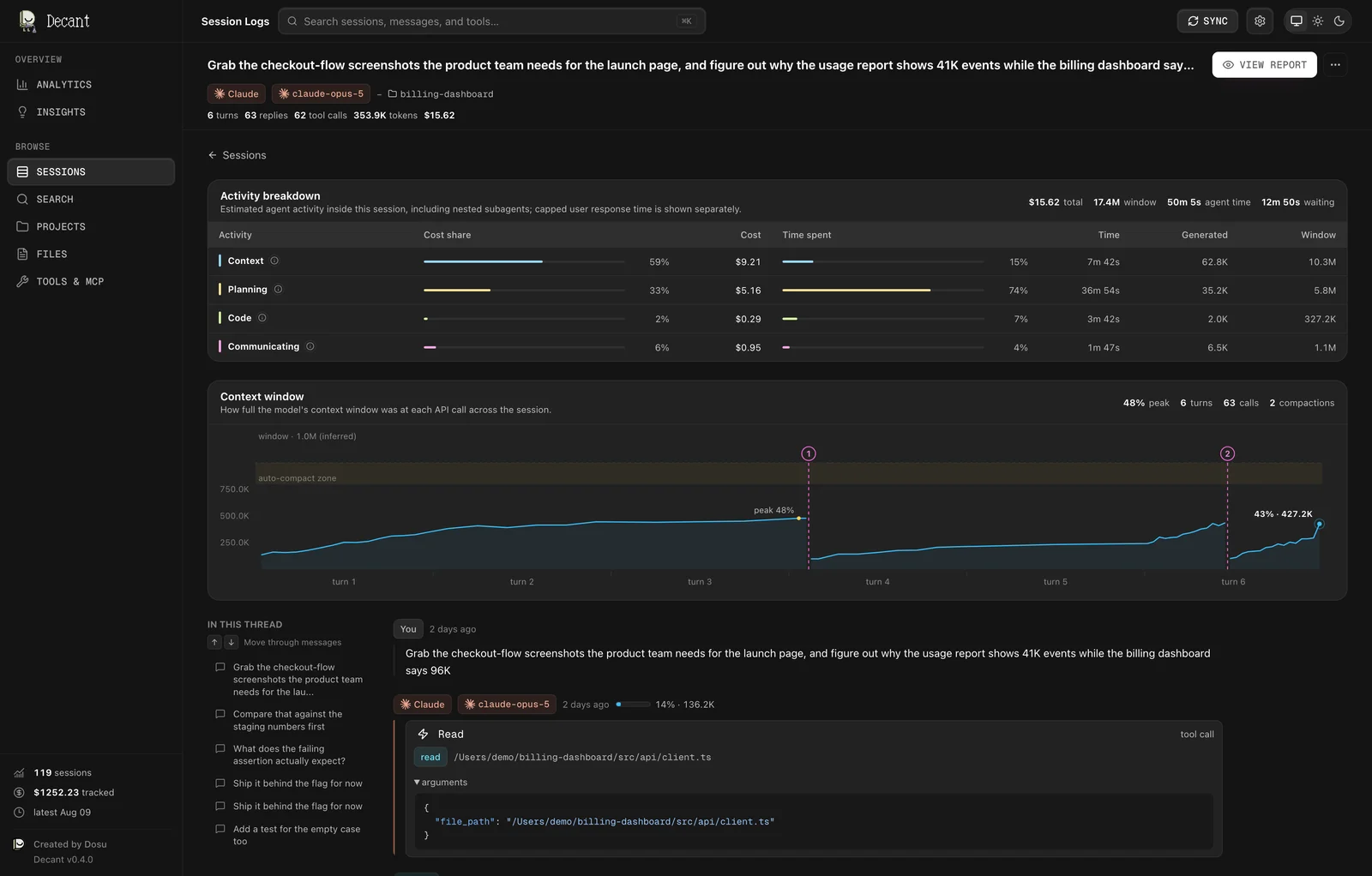
Decant's session view on the demo archive, showing one run's activity breakdown, the context window chart with two compactions, and per-reply context gauges.
We love using Dosu's MCP for all our workflows, so we watch the Tools & MCP view closely. Decant helps us look into our MCP tool calls, for Dosu and other providers, to understand what context helps most during a full run.
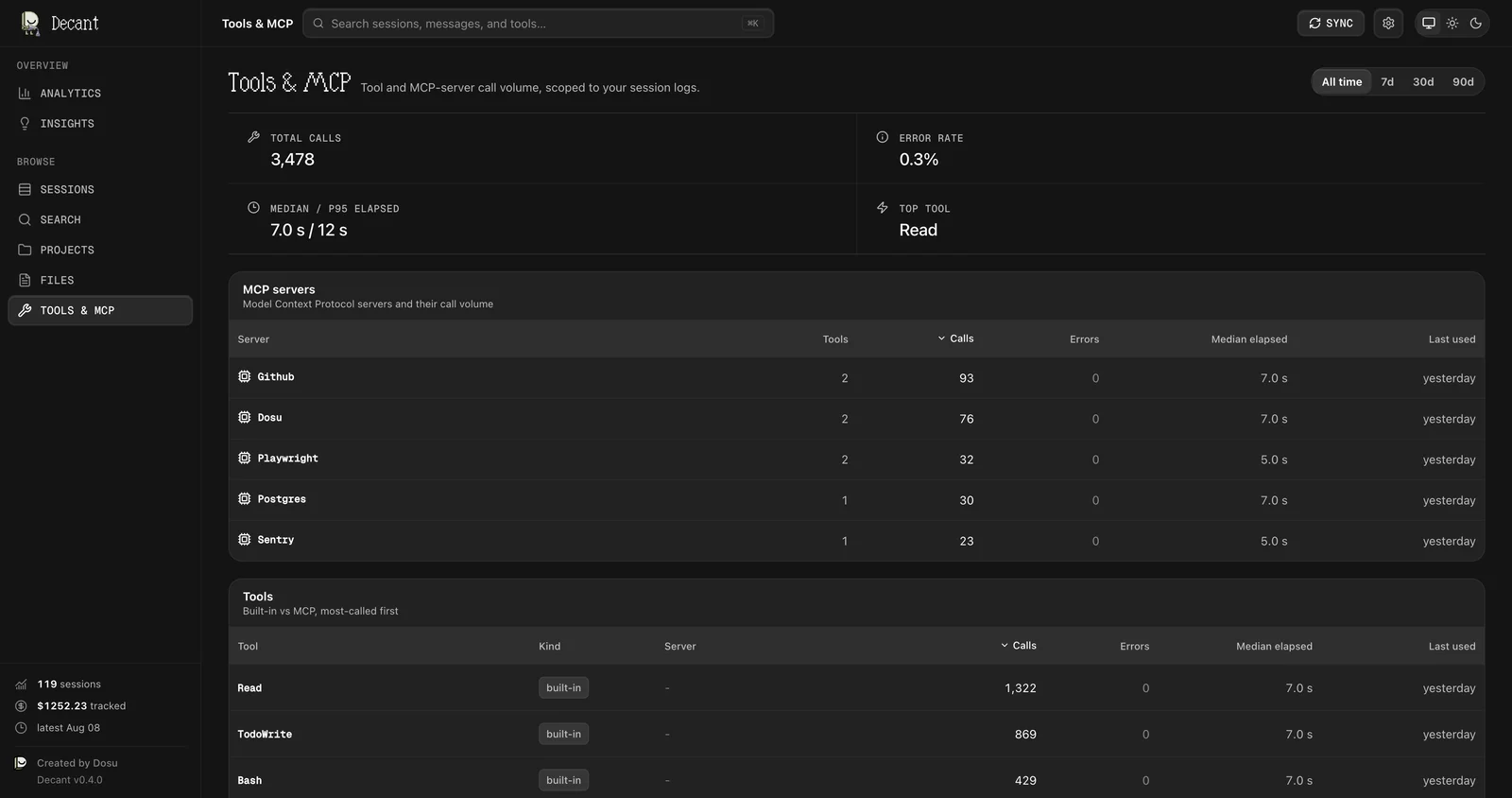
Decant's Tools & MCP view on the demo archive with 3,478 tool calls, the built-in tools ranked by volume, and the MCP server table with call counts and error rates.
Why we built Decant
Decant is open source, Apache 2.0, and runs on Bun via TypeScript. We're using Decant to understand how efficiently we work and where we can improve our agent runs. Our hope is that Decant is a helpful, informative, and insightful tool to help you explore your agentic sessions. The patterns that we're able to see with Decant show us that agents tend to relearn things our team already has information about. Getting your agents knowledge faster and cheaper is the problem Dosu exists to solve.
A few more things you can do with Decant today:
- A full CLI mirrors the app, so
decant statsordecant filesanswer questions without leaving your terminal. - Every read command takes
--json, and a documented local API means your agents can query your own history. decant distillturns patterns into workflow scripts, skills, or AGENTS.md sections, redacting secrets on the way out.- Full-text search helps you find messages and tool calls across your agent sessions.
Run npx @dosu/decant@latest today, star the repo, and open the issues or feature requests you want to see next. Decant's job is visibility, turning the logs your agents write into real numbers for what they did and how much it cost.
You can use Dosu to help with setting up durable knowledge infrastructure for your agents and make your sessions cheaper, faster, and more effective at scale. Start using Dosu today and give your agents the knowledge they keep looking for.
Found this article helpful?
Share it with your network to help others discover valuable insights.
Want more like this? Subscribe via RSS
Related Articles
September Drop: Dosu goes back to school
Sep 23, 2026 / 6 min read
Dosu studies coding sessions, shows what your agent reads, and makes your credits go further.
How to Build Agent Memory: Maintenance
Sep 21, 2026 / 7 min read
How to keep agent memory useful as things change: preserve evidence, scope updates, choose maintenance triggers, and measure whether memories still help.
How to Build Agent Memory: Search & Retrieval
Sep 13, 2026 / 9 min read
How agents find and use what they've learned: choosing a search strategy, returning useful context, and balancing precise evidence with higher-level understanding.
A Correct Translation Can Still Be Wrong in Meaning
Sep 8, 2026 / 4 min read
A settings label translated 'correctly' and still meant the wrong thing. The fix wasn't a better dictionary, but context — and it's already scattered across your code, PRs, and conversations.