October Drop: Connect remote MCP servers to Dosu
This month's tricks bring Dosu into the tools you work in, from Sentry and Slack to Claude Code and Codex.


Welcome back to the monthly Dosu Drop! Halloween is almost here, and Dosu spent October learning some new tricks. Dosu answers with live context from the MCP servers you connect, reviewers approve knowledge updates without leaving Slack, and Claude Code and Codex load Dosu's tools as each session starts. If security review has kept your company from trying Dosu, you can run a trial inside your own environment. And if your coding agents keep tripping over the same steps, we're looking for a few teams to help us fix that.
Connect remote MCP servers to Dosu
Dosu calls MCP tools that you connect to your Library, so answers can include up-to-date context from GitHub, Sentry, Datadog, Confluence, and more. MCP Tools is in beta, and Dosu uses these tools when it answers in Slack and on GitHub, GitLab, and Azure DevOps.
After you connect a server, try summoning some live context…
@Dosu which Sentry issues started after yesterday's checkout deploy?
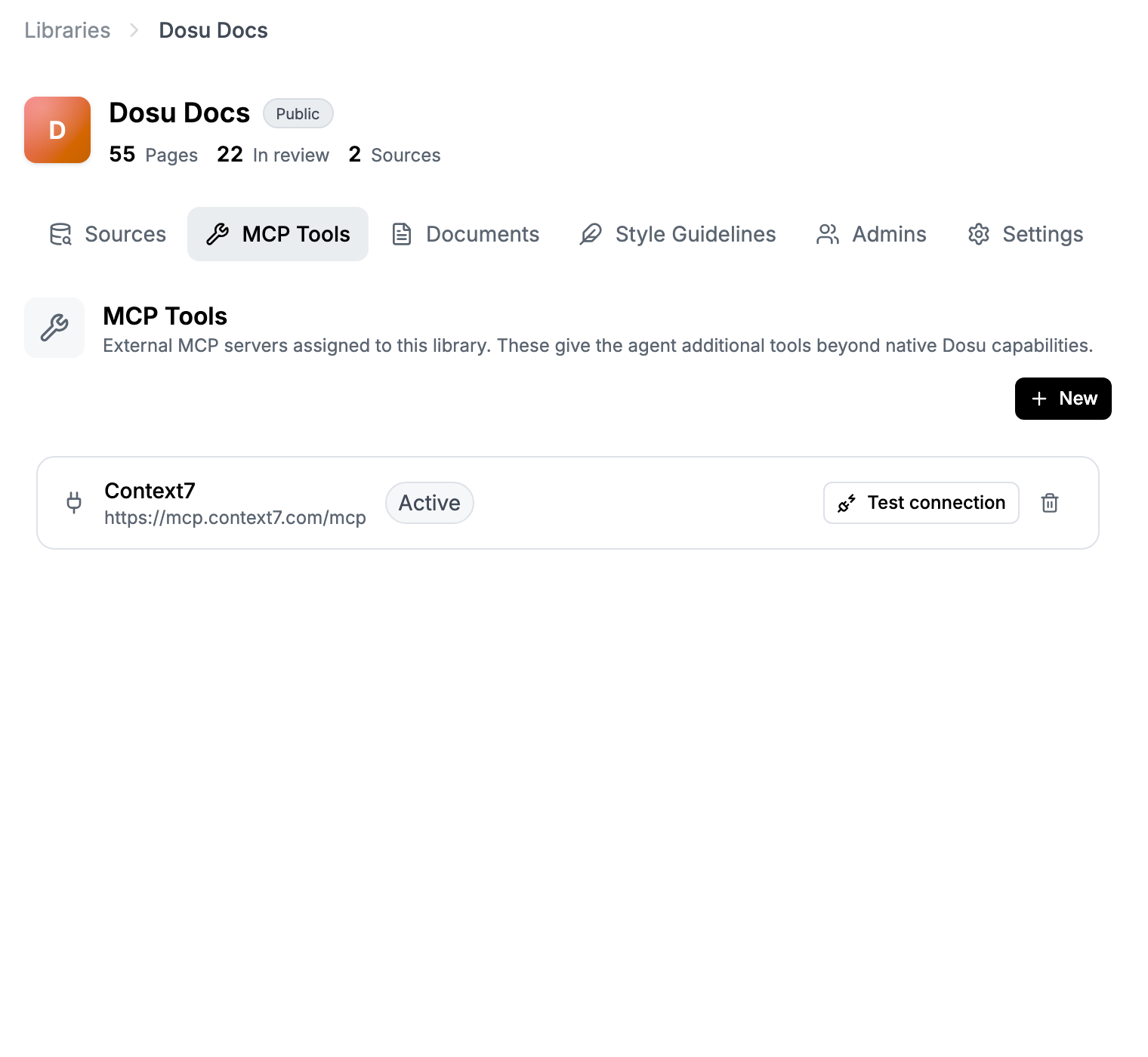
Connecting a server takes three steps.
- Open a Library and go to MCP Tools.
- Choose New, then pick GitHub, Confluence, Sentry, Datadog, or a custom MCP server.
- Select Test connection to see how many tools Dosu found, then save.
A custom server needs a public HTTPS URL that supports Streamable HTTP. Dosu can authenticate with an API key, a bearer token, basic auth, or custom headers. Organization owners and admins manage connections. Because some MCP tools can change data, start with read-only credentials.
Approve Dosu's knowledge updates in Slack
Dosu sends you a Slack message when something is waiting for review. Ask your coding agent to set up notifications with the Dosu CLI, then accept or decline knowledge updates from Slack. Dosu threads each update under a summary, with an explanation, a diff excerpt, and Accept, Decline, and Edit in Dosu buttons.
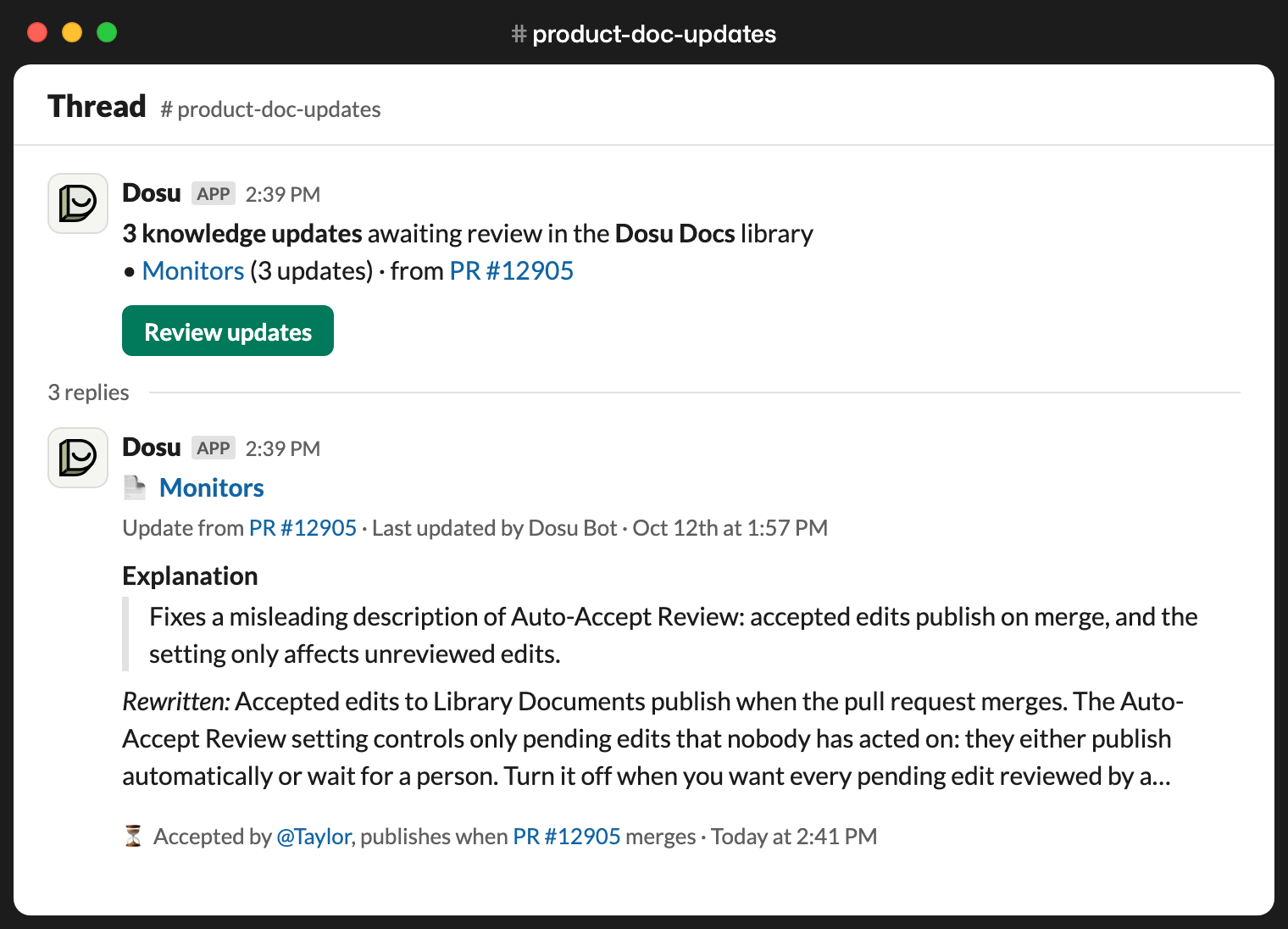
You can also turn on Slack Notifications in your Library's Settings tab. Like any good vampire, Dosu needs an invitation to a private channel, so run /invite @Dosu there first. Library members who link their Slack account to Dosu can act on updates from the thread.
Two more changes make a review pass quicker.
- The review queue opens on the last 30 days. Choose All time or a Custom range under Filters, then Mark all as read or Archive all to clear the cobwebs from that range.
- Run
dosu review list --since 7dto list pending review items from the last 7 days, so a weekly review starts with only what's new.
Deeper research behind Dosu's answers
We rebuilt the agent behind Dosu's answers, so Dosu digs further into your Library before it replies, and its slowest answers arrive about half a minute sooner. The new agent also works through every part of a multi-part question instead of putting some parts off.
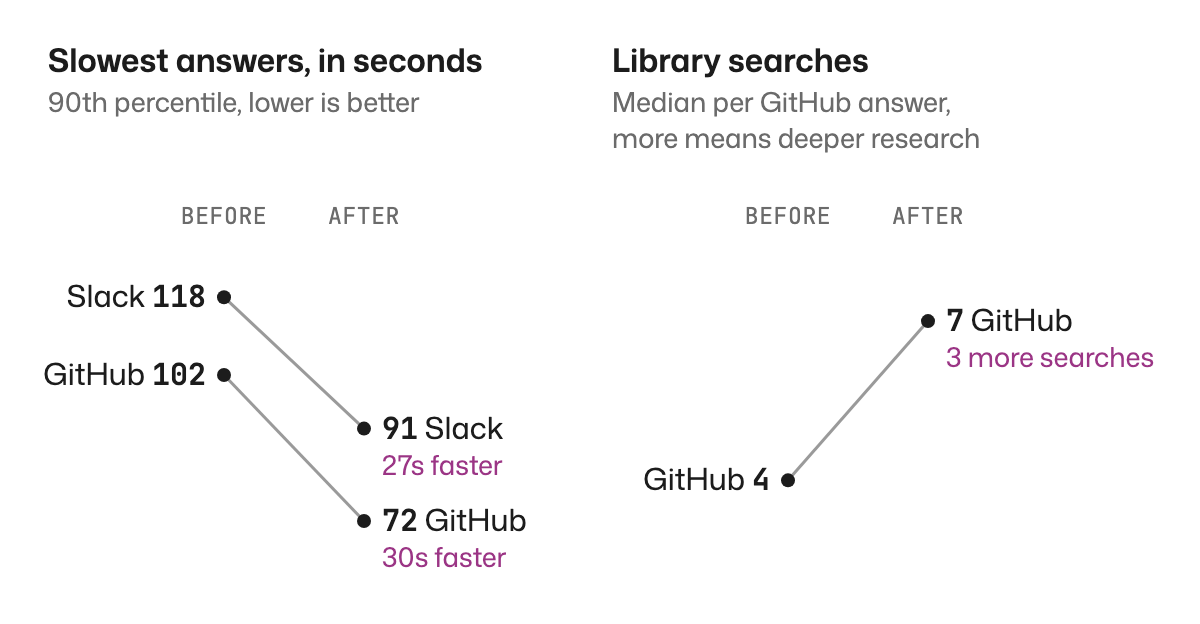
Dosu's answers picked up a few more improvements.
- Dosu reads the images people add to Slack threads, so a screenshot of an error becomes part of the question.
- When a question depends on earlier messages, Dosu reads the thread and the Slack channels in your Library before it answers.
- Slack shows when Dosu is working on your question, and a stop button lets you end the run without a reply.
- When Dosu drafts a reply on its own and the draft only partly answers the question, Dosu holds the draft for human review and explains why, instead of discarding it.
Dosu's tools load at session start
Claude Code and Codex now load Dosu's tools at the start of each session, so your agent checks your team's knowledge whenever a task calls for it. Before, both agents lazy-loaded the tools and rarely used Dosu unless you explicitly asked.
Unlike MCP Tools, which lets Dosu call the MCP servers you connect, this change covers Dosu's own MCP server inside your coding agent. If you installed the Dosu CLI with npm, pnpm, Yarn Classic, or Homebrew, the CLI updates itself in the background and rewrites the Dosu entry it added to Claude Code and Codex, so those installs pick up the change on their own. Script installs pick it up the next time you run the install script, and recent Codex releases support the new setting.
New to the CLI? Get it from the dosu-cli repo, which lists every install option, or install it on macOS or Linux with this script.
curl -fsSL https://cli.dosu.dev/install | sh
Then run dosu setup to connect Dosu to your coding agents.
The Dosu CLI picked up a few more changes since our last Drop.
- Repository-scoped knowledge capture. Run
dosu, open settings, and select repositories under study scope. Dosu captures knowledge only from sessions in those repositories, counts clones and worktrees of the same repository once, and skips sessions outside git. - Per-agent opt-out. Run
dosu knowledge incognito on claude(orcursororcodex) to exclude that agent's sessions from knowledge capture. Sessions that finish while incognito is on stay out of knowledge capture, even after you turn it off. - Automatic update control. Run
dosu upgrade --auto offon machines where you pin the CLI version.
Try Dosu inside your own environment
When a hosted trial can't get through security review, a limited version of Dosu runs as a container inside your own environment. Your coding agent walks you through setup, and we provide prompts to connect Dosu to your systems. On the call, we'll cover what the trial includes and what it needs from your environment. Book a call to start a self-hosted trial.
Monitor, Azure DevOps, and Confluence
- Set a Source's When to Review Changes to On merge only, and Dosu reviews each pull request once it merges instead of while it's still changing.
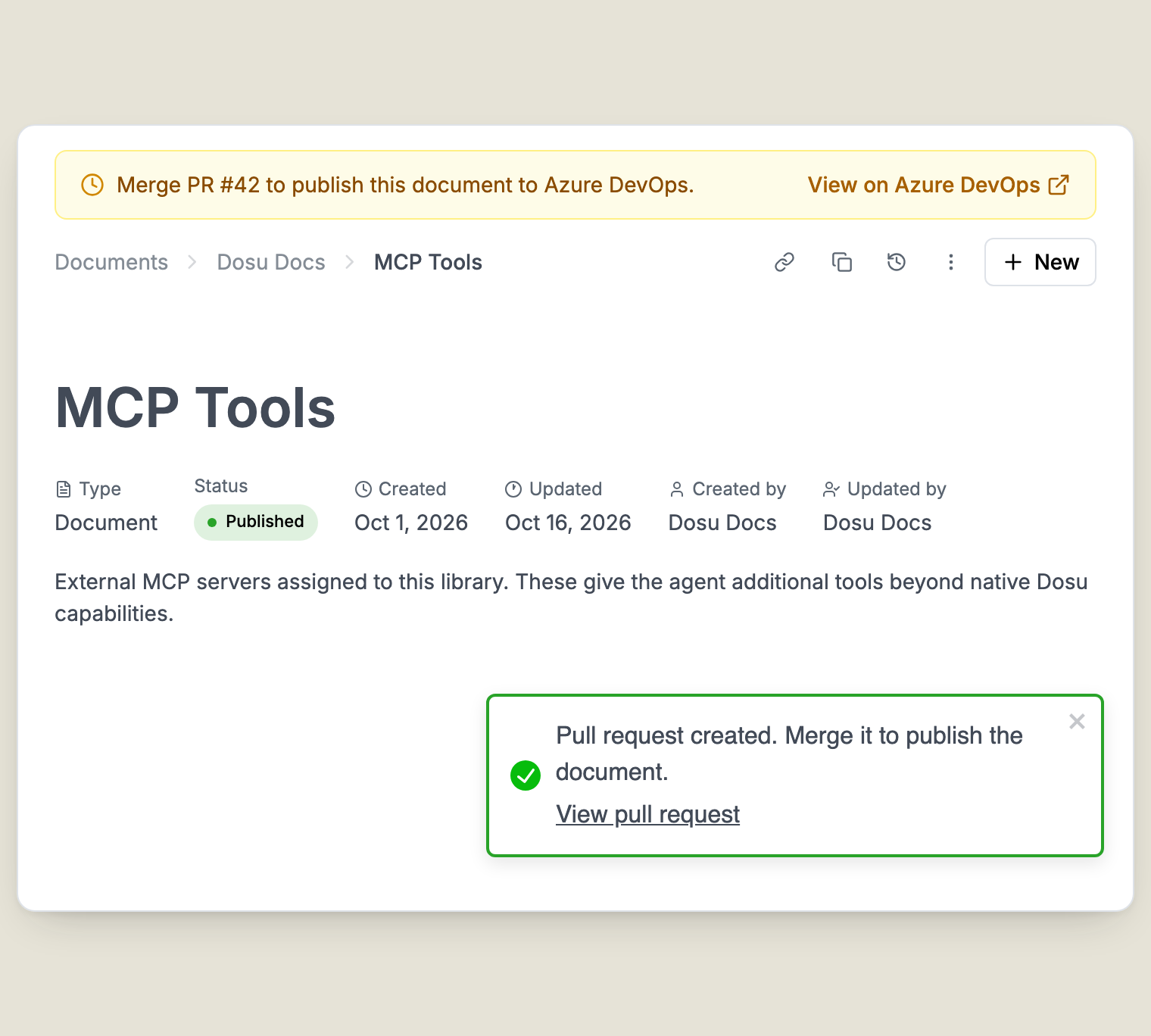
- The Publish outside Dosu dialog has an Azure DevOps tab that opens a pull request with your document, so Azure DevOps teams review doc changes the same way they review code.
- Confluence Sources accept a Scoped API Token, including one from an Atlassian service account. Dosu checks the token when you connect, so a bad token fails right away instead of during the first sync.
Two new studies from the Dosu lab
Our two newest studies dig into where coding agents spend their budget and what they keep relearning.

We ran Claude Code on Opus 5.5 and Codex on GPT 6.1 Sol against the same 49 pull requests. Codex's lower estimated cost came entirely from high-scope tickets, where it cost less on 17 of 20. We didn't score the patches for correctness.

Across 107 Claude Code and Codex sessions, 68 facts recurred across tickets. The study looks at which of those belong in shared memory and what a saved document needs to keep.
Help shape agent developer experience
We're looking for design partners who want to improve agent developer experience for the coding agents building their systems. When we analyzed our own agents' sessions, agents ran into problems on about 20% of their attempts to run integration tests. In the best case, agents needed 7 steps to run the tests, and some couldn't work out the procedure on their own. In our own codebase, Dosu gives our agents that procedure, and it also found a simple change to our make target that cut the process to 2 steps.
Sessions also cost up to 40% more when our agents had no procedure for a common tricky task, and sometimes an agent faked its testing altogether. Our guide to procedural memory for coding agents walks through turning an agent's discovery into a shared procedure.
Curious what trips up the agents in your codebase? Talk to us about becoming a design partner.
We're all out of treats for this month! Next month, we'll follow coding agents into the corners of a codebase where they keep getting stuck and look at what it takes to get them moving again. Until then, may your agents remember what they learned and forget every jump scare. Happy Halloween, and join the spirited discussion in the Dosu Discord!
Devin Stein
Founder and CEO
Found this article helpful?
Share it with your network to help others discover valuable insights.
Want more like this? Subscribe via RSS
Related Articles
Turning Coding Sessions Into Shared Agent Memory
Oct 12, 2026 / 9 min read
Recurring discoveries in Claude Code and Codex show why shared agent memory needs explanations and sources.
How 20 Vercel AI SDK tickets drove the agent cost gap
Oct 6, 2026 / 17 min read
Claude Code on Opus 5.5 and Codex on GPT 6.1 Sol attempted the same 49 tickets. The recorded cost gap came entirely from high-scope work.
Procedural Memory for Coding Agents: Turning Knowledge Into Action
Oct 2, 2026 / 16 min read
Learn how to turn a coding agent's discovery into a shared procedure, choose where the instructions belong, and check that the next agent uses them correctly.
Semantic memory for coding agents needs a history
Oct 1, 2026 / 10 min read
Your coding agent needs to know which facts still apply. Our Celery-to-DBOS migration shows why semantic memory needs scope, dates, and source evidence.