Automate recurring work with Dosu Templates
Turn recurring, judgment-heavy work like release notes, status updates, and triage into a reusable Dosu Template that Dosu drafts from your connected sources.
 Taylor Dolezal/Jun 23, 2026/5 min read
What tasks do you work on that require a lot of time and care to complete? For me, one of those tasks is crafting our weekly community update, a post we share in our Discord every week about what we have shipped at Dosu.
Deciding what goes into that update is the most difficult step, as the engineering team ships a LOT of features, week over week. We want to share what best connects with our community. I used to spend many hours reading tickets, PRs, and asking team members about what certain features or changes happened in Dosu. Then I would work out which changes went live (e.g., some features might be behind feature flags while we are still testing them). Finally, I would reach out to our team to see if there was anything else that I might be missing, or what they might want to spotlight in these posts. Clearly, this doesn't scale and there's always plenty of other things to work on. So how do we keep this task manageable as we continue to scale?
Automating work with Dosu Templates
We recently launched Templates in Dosu to help with exactly these types of tasks! A few templates come ready-made, like AGENTS.md files, though what if you need a custom template? I took some time to write down the structure our weekly posts follow, and documented the decision tree we tend to follow each week, like omitting features still behind a feature flag. Dosu already has context from GitHub, Slack, and our team's agent runs, so when I generate a Document, Dosu gets to work researching everything that happened over the past week and drafts it using my custom Template.
Here's the custom template I wrote for our weekly update, in markdown:
# Discord post draft

Hello and happy Wednesday, @everyone!

*Bridge sentence connecting last week's theme to this week's, then one sentence previewing the headliners.*

Here's what's new this week:

🆕 **Playful feature title** — *1–3 sentences on what the reader can now do, not what we changed. Exact commands in backticks. Biggest change first. 4–7 items total. Puns encouraged. Attach a video or screenshot for the top 1–2 items.*

✨ **Other wins this week**

- *Small fixes and quality-of-life improvements worth one line each.*

*Close with one engagement question or call-to-action tied to the headline feature.*
Each heading is a section Dosu researches and fills, with directions about what to say and how to order it.
Now any of my Dosu teammates can utilize this template, and help improve it, as now we have a central place to keep this workflow up to date, infused with our organizational knowledge, thanks to Dosu.
Get Dosu's help when gathering knowledge
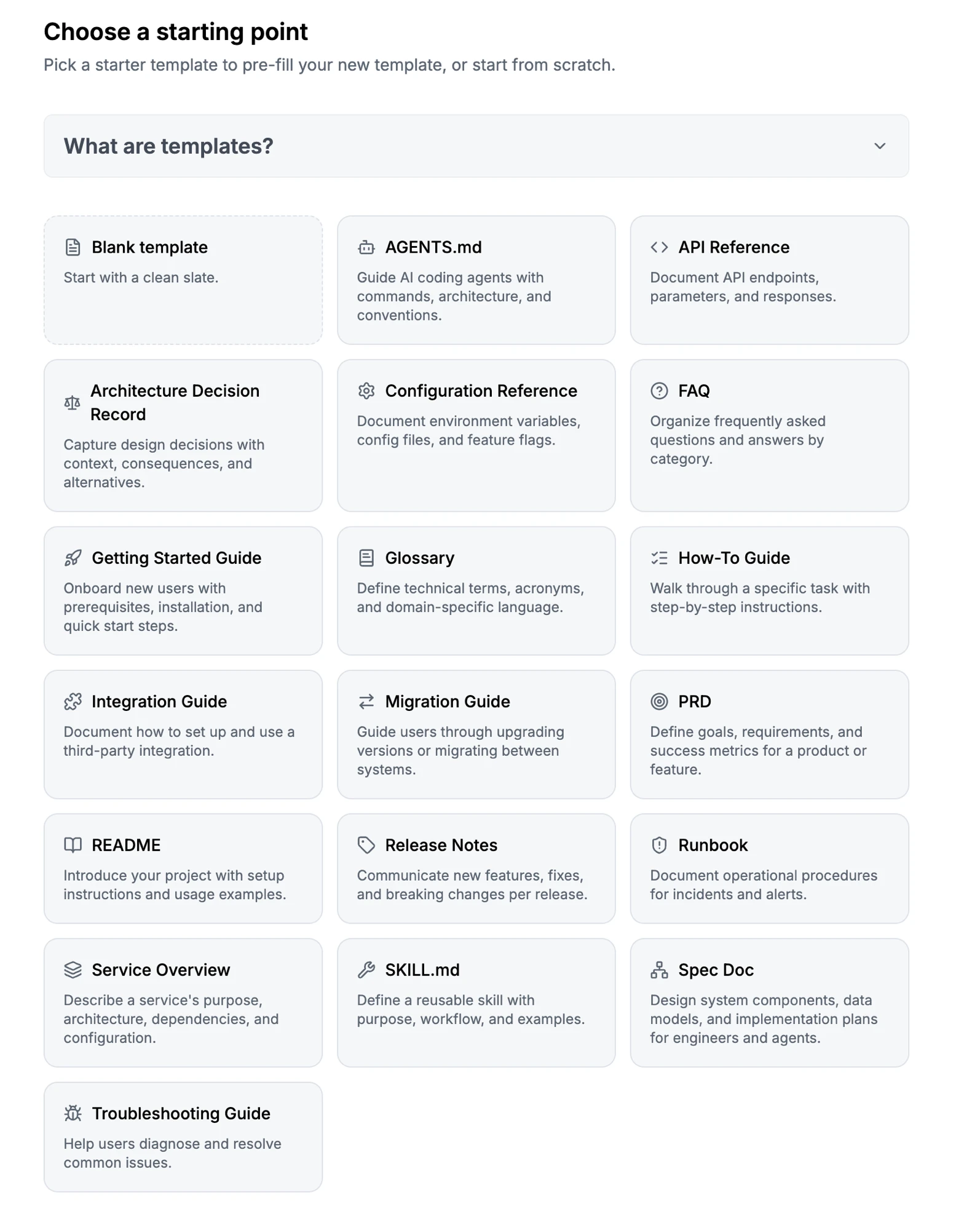
Every starter template in Dosu, ready to use today.
You don't have to write your own Templates, either. Dosu ships with ready-made starter templates for things like AGENTS.md, API Reference, Getting Started Guide, and many more!
Now with a draft in hand, I can make final edits on tone, call-outs, and anything else I spot before I share with our community.
What makes a template worthwhile?
If you want to use Dosu Templates for your workflows, I recommend a few things:
Start with a description about what your document covers, instead of a brief description. Dosu picks which template to use by matching a description against the topics it finds during the research step. The more your description captures the subject, the more reliably Dosu picks the right template. Clear descriptions beat short or clever naming conventions, every time.
Specify your desired document structure in the body of the template, and any sections you want to include. Templates will respect the order you give them, so you can put the most important sections first. Dosu treats those sections as a checklist and researches what you want to cover. Underneath the headings, write down any information about decision or judgment calls you typically make. You can add more involved steps, too, like what information you'd like your document to lead with vs. what should be a shorter mention or sentence.
Don't put voice in the template at all. Tone and formatting live in your Library's custom guidelines, which Dosu applies to everything it writes.
Make sure to publish your template. If you don't, then Dosu can't match it. Plus, once you do, the rest of your team can work with your template.
Dosu Templates help you scale your work. Likely, you have a task that's perfect for automation. Maybe it's release notes, triage on an active repo, or even an onboarding checklist for your newest team member.
Take back your time and spend it on what truly counts. Start using Templates in Dosu, today.
Related reading
- A stale AGENTS.md is worse than no AGENTS.md. Where Dosu's native templates started, and why keeping them current matters.
- AI Is Better at Maintaining Docs Than Humans. The case for letting Dosu do the gathering and the upkeep.
Found this article helpful?
Share it with your network to help others discover valuable insights.
Want more like this? Subscribe via RSS
Related Articles
How to Build Agent Memory: Search & Retrieval
Sep 13, 2026 / 9 min read
How agents find and use what they've learned: choosing a search strategy, returning useful context, and balancing precise evidence with higher-level understanding.
A Correct Translation Can Still Be Wrong in Meaning
Sep 8, 2026 / 4 min read
A settings label translated 'correctly' and still meant the wrong thing. The fix wasn't a better dictionary, but context — and it's already scattered across your code, PRs, and conversations.
How to Build Agent Memory: Knowledge Capture
Sep 6, 2026 / 7 min read
How to decide what agents should remember: five questions for evaluating knowledge, choosing its structure, and capturing discoveries for future work.
How to design a CLI login flow for coding agents
Sep 1, 2026 / 9 min read
Design a CLI login for coding agents with a ticket flow that pauses, resumes in a new process, and returns the next command in JSON. Learn how Dosu built it.