May Drop: New usage analytics to see Dosu's impact
Plus: bulk doc generation, support for more formats, and agent-driven setup


Welcome back to the monthly Dosu Drop. We’re kicking off the summer by firing up a fresh set of juicy new features for you.
New usage analytics
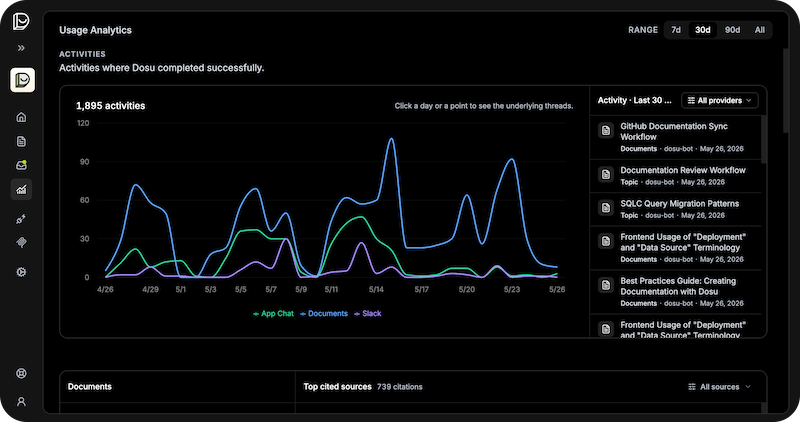
We’ve added a new Analytics tab in the Dosu app. The goal is to help you understand the value of Dosu by showing an aggregate view of where the Dosu agent has been active, what knowledge has been referenced the most, and how people are reacting. This is just the first step, and we’ll be adding more functionality in the coming months. If there’s a stat you’d like to see, let us know on Discord.
Bulk generation lets you build docs faster
If you’re itchin’ for Dosu to cook up a big batch of docs, all you’ve got to do is ask! Previously, Dosu was only able to create 1 document per request. We’ve removed that limitation, so now you can ask Dosu to write many docs with a single message. To try it out, send Dosu a message like…
@Dosu make changelog docs for the past 2 weeks, creating a separate doc for each of our main modules:
frontend,backend,dbanddeploy.
You’ll be docsmaxxing with Dosu in no time.
Support for new doc formats
We’re constantly looking to expand the formats that Dosu can read and write. This month, we’ve added support for the AsciiDoc format (.asciidoc or .adoc files), as well as any files you might have using the .markdown extension rather than .md. These files are now all fully supported for importing and maintaining with Dosu, alongside our existing Markdown and RST support.
Interactive setup on Slack
Setting up additional Slack channels is easier than ever. If you’ve already installed the Dosu app in your Slack workspace, you can just mention @Dosu to add it to a new channel. You’ll get prompted to select which external connections Dosu can reference when replying in that channel, and then you can start chatting immediately. Direct messages with Dosu work the same way - pick the connections you want and you’re on your way.
Let your agent configure Dosu
We’ve been working on making our CLI tools more agent-friendly, and now it’s possible to set up Dosu by asking your agent to take care of it. Just tell your coding agent where to find our CLI and it will take care of the rest. For example, you could tell Claude…
Set up Dosu using their CLI: npx @dosu/cli setup --agent
Your agent will walk you through signing in, setting up the MCP, and getting Dosu ready to use.
That's all for this month! Until next time,
Devin Stein
Founder and CEO
Found this article helpful?
Share it with your network to help others discover valuable insights.
Want more like this? Subscribe via RSS
Related Articles
Semantic Memory for Coding Agents: Facts Need an Expiration Story
Oct 1, 2026 / 8 min read
A fact about your codebase can stay relevant after it stops being true. Our Celery-to-DBOS migration shows why coding-agent memory needs scope, dates, and sources.
Episodic memory for coding agents: What survives your sessions
Sep 29, 2026 / 14 min read
Episodic memory is a coding agent's record of past sessions. Saved lessons can outlive the transcripts behind them, so keep each lesson tied to its source.
September Drop: Dosu goes back to school
Sep 23, 2026 / 6 min read
Dosu studies coding sessions, shows what your agent reads, and makes your credits go further.
How to Build Agent Memory: Maintenance
Sep 21, 2026 / 7 min read
How to keep agent memory useful as things change: preserve evidence, scope updates, choose maintenance triggers, and measure whether memories still help.