Always Up to Date: Using AI to Generate and Maintain Documentation
Keep docs in sync automatically. Dosu generates, updates, and self-documents PRs so your documentation stays accurate with every code change.

Documentation starts perfectly on launch day, then slowly drifts. New functions ship without examples, parameters change, and the onboarding Quick Start becomes a scavenger hunt. Developers compensate by reading code and pinging teammates, burning hours that never appear on the burndown chart.
Dosu’s Generate Docs feature was built to stop that drift. It treats docs like living code: every time your repository changes, Dosu checks whether the public story still aligns with reality, creates a draft update if needed, and leaves humans to review and merge. What you get is continuous documentation that stays in sync with your product, rather than lagging behind it.
Why documentation drift hurts velocity
- Onboarding stalls. New hires spend days reverse-engineering code paths when the setup guide is outdated.
- Support load grows. Questions that docs should answer reach chat channels and issue trackers.
- Release risk rises. When docs lag, users run old commands and encounter undefined behavior, filing bugs that are actually documentation defects.
Keeping docs current is essential, yet most teams revisit them only at release time or during occasional documentation sprints. AI closes that gap by monitoring changes in real-time.
How Dosu generates documentation
The Generate Docs engine reads three primary signal streams:
| Input | What Dosu extracts | Why it matters |
|---|---|---|
| Code diffs | New or modified functions, classes, endpoints | Shows the exact surface that changed |
| Pull-request conversations | Developer intent and design rationale | Captures context not obvious from code alone |
| Issues and tickets | Real user questions and pain points | Informs examples and troubleshooting tips |
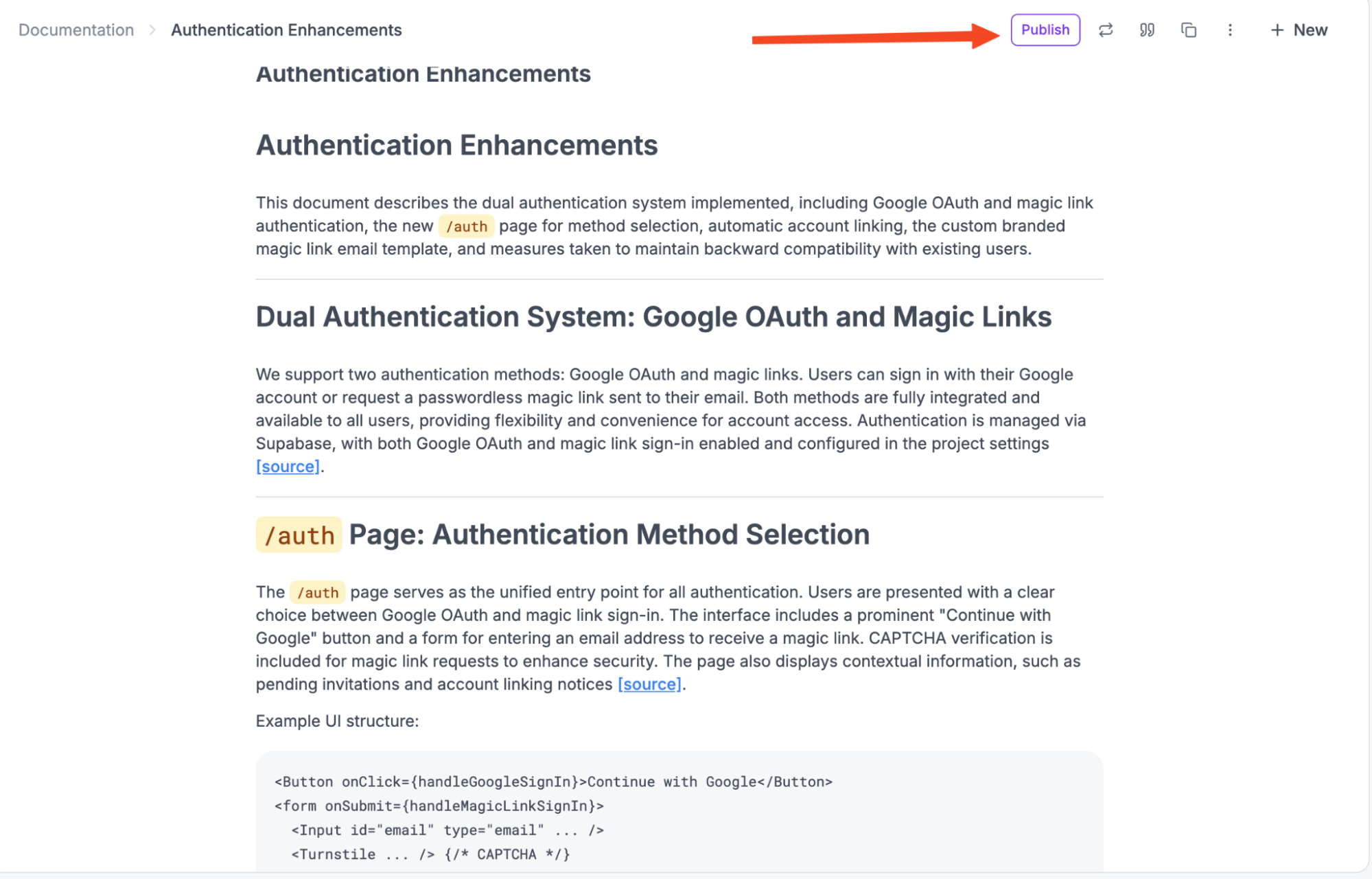
Dosu blends these signals, writes an initial draft, and saves it in your Docs workspace as Draft content. Nothing goes public until a maintainer clicks Publish. This keeps human oversight squarely in the loop.
And once a doc is published, Dosu now goes a step further with self-documenting PRs. When you merge a pull request, Dosu automatically finds related published docs, updates them if needed, and posts a summary comment directly on the PR. Draft docs are ignored, so you control exactly which pages are maintained automatically.
A walk through the workflow
- Merge a pull request The CI pipeline completes. Dosu detects the changes in the repository.
- Compare code to docs The agent checks whether the current docs mention the updated symbols or behavior.
- Draft missing or updated sections If gaps exist, Dosu creates a new doc page or edits an existing one.
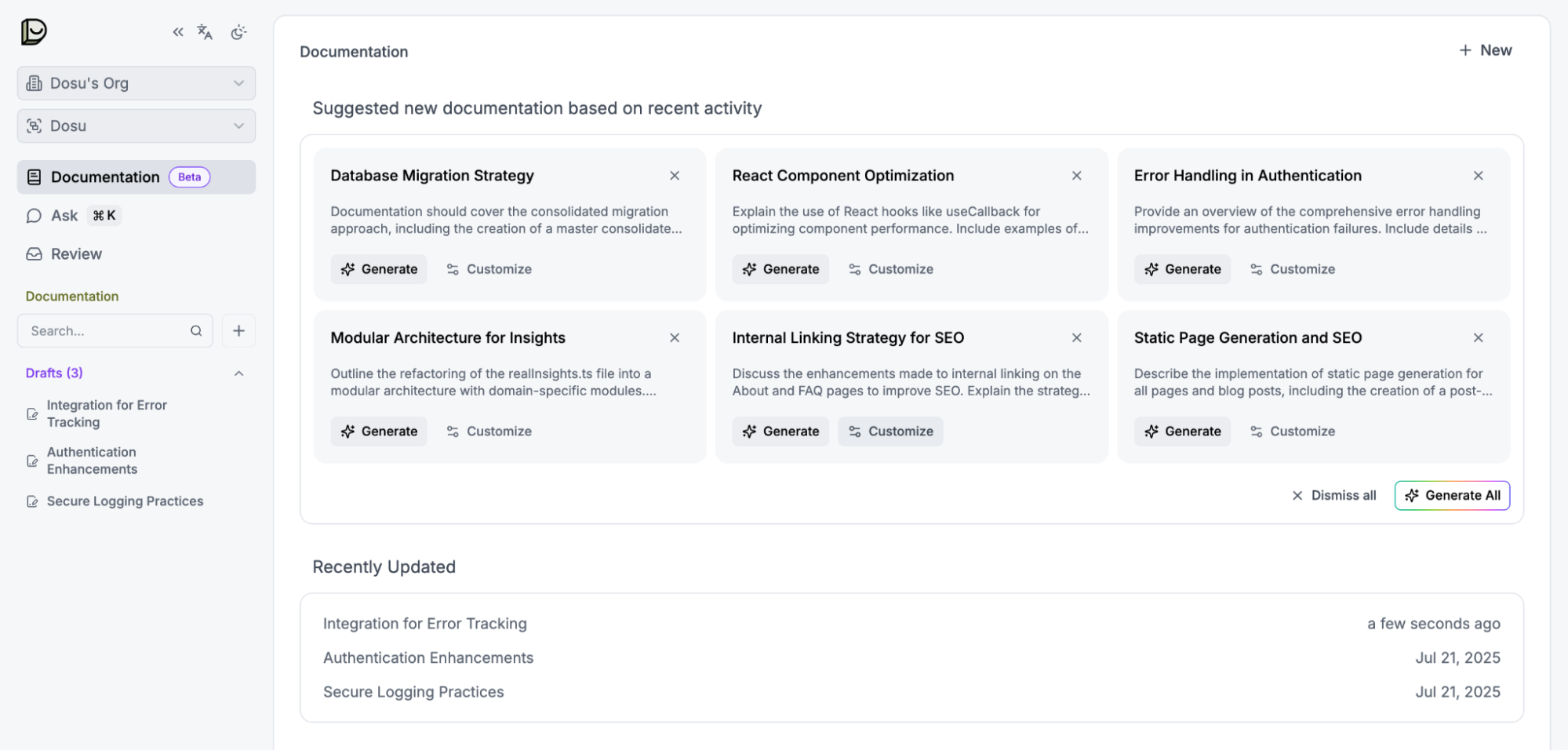
- Dosu suggests new documentation The AI prompt appears in your Docs dashboard you can then ask Dosu to generate.
- Human review Maintainers comment, edit, or approve. Dosu learns from edits, improving future drafts.
- Publish and track After approval the page moves to Published. Dosu now monitors future changes to keep it aligned.
- Self-documenting PRs After a merge, Dosu edits any related published docs and leaves a PR comment summarizing the changes. This keeps reviewers aware of doc updates alongside the code they just shipped.
Rolling out Generate Docs without surprises
Start small. Pick a low-traffic repository or a single module and enable Generate Docs:
- Connect sources in the Dosu dashboard. Point the feature at your main branch and any relevant folders.
- Keep everything in Draft mode for the first sprint. Review each generated doc like code review.
- Tune signal weight. If you see overly verbose drafts, lower the weight of commit messages. If examples feel thin, add more issues as data sources.
- Publish when confident. Once you trust the drafts, approve and merge. You can still reject or edit any future proposal.
Teams usually move from draft-only to publish-with-review within two sprints.
Once you’re comfortable, enable self-documenting PRs for one or two critical pages. Start small by picking a stable API or setup guide and reviewing the PR comments Dosu adds. As confidence builds, expand coverage to more published docs.
Integrating with other automation loops
Generate Docs shines brightest next to Dosu’s other features.
| Upstream automation | Benefit to docs |
|---|---|
Auto-Labeling attaches area:docs or kind:feature tags to relevant tickets | Dosu can filter issues that need new documentation sections |
| Issue Triage + Q&A surfaces repeat questions | Frequent queries become examples in the docs, closing the loop on support noise |
Public questions answered by the Q&A agent also feed back into the doc engine, so the knowledge base grows naturally, not in ad-hoc bursts.
Measuring success
Track three simple metrics to see the payoff:
| Metric | Before AI | After AI |
|---|---|---|
| Doc drift count (PRs merged without doc update) | High | Near zero |
| Time to publish docs after feature merge | Days | Hours |
| Support tickets answered by docs link | Rare | Common |
| PRs with doc auto-edit comment | None | Consistently triggered on relevant merges |
| Auto-edit acceptance rate | N/A | High (edits rarely need changes) |
Export drift data from your GitHub actions log or use the Dosu dashboard counters. A steady decline in drift indicates that the loop is functioning properly.
Common questions
Will the drafts match our style guide? Yes. Dosu reads any CONTRIBUTING or STYLE files in your repo and applies those rules when drafting. Reviewers can still tweak voice before publishing.
What if proprietary info leaks? You control which folders and discussions are fed into the model. Exclude anything sensitive, and drafts will avoid it.
Can we version docs? Generate Docs tracks branch names so that you can tie documents to versioned releases. Each published page records the commit hash that generated it.
Quick-start checklist
- Open Datasources in the Dosu dashboard.
- Add code, PR, and issue sources.
- Enable draft generation for one repository.
- Review two weeks of drafts. Edit and publish the useful ones.
- Expand to more modules once accuracy holds.
- Publish one doc page and merge a small PR to see a self-documenting comment with the proposed doc edits. Adjust the scope before rolling it out wider.
Conclusion
Documentation should evolve with code, not chase it. By tapping into the same signals, developers create code diffs, PR chatter, and real user questions every day. Dosu turns doc maintenance into a side effect of everyday work rather than a hero project. The payoff is faster onboarding, fewer support pings, and a codebase users can trust.
Ready to try it yourself? Check out the docs for Documentation Generation and start getting your documentation generated before your eyes.
Found this article helpful?
Share it with your network to help others discover valuable insights.
Want more like this? Subscribe via RSS
Related Articles
Turning Coding Sessions Into Shared Agent Memory
Oct 12, 2026 / 9 min read
Recurring discoveries in Claude Code and Codex show why shared agent memory needs explanations and sources.
How 20 Vercel AI SDK tickets drove the agent cost gap
Oct 6, 2026 / 17 min read
Claude Code on Opus 5.5 and Codex on GPT 6.1 Sol attempted the same 49 tickets. The recorded cost gap came entirely from high-scope work.
Procedural Memory for Coding Agents: Turning Knowledge Into Action
Oct 2, 2026 / 16 min read
Learn how to turn a coding agent's discovery into a shared procedure, choose where the instructions belong, and check that the next agent uses them correctly.
Semantic memory for coding agents needs a history
Oct 1, 2026 / 10 min read
Your coding agent needs to know which facts still apply. Our Celery-to-DBOS migration shows why semantic memory needs scope, dates, and source evidence.